Delivered
Enterprise Design
B 2 C
Strategic UX
System Thinking Design
At Aude.ai the engineers were struggled to trust and act on AI-generated performance insights by there performance evaluation platform , leading to low adoption. I stepped in to reframe the problem through research, redesign the experience around transparency and actionability, and introduce human-in-the-loop coaching turning insights into meaningful growth for engineering teams.
Potential Impact estimated in both business and product
Business Metrics
Success would be measured by an increase in engineer adoption, with a target of 50–60% active usage within the first few evaluation cycles.
We considered coaching successful if at least 30–40% of active users initiate or participate in a coaching session over a quarter.
Manager enablement would be measured by frequent use of team and coaching views, with a target of 70%+ manager engagement.
Product Metrics
We considered success when a majority of users could confidently complete a next-step action after viewing feedback.
Coaching conversion would be considered successful if 20–25% of surfaced insights led to a coaching interaction.
We aimed for an SUS score of 75+, indicating strong usability and learnability.
Project Type
Enterprise Design, Industry Sponsored Project
Project Duration
August 2025 - December 2026
(5 month)
Team
8 members with beginner to expert level skills
Skills
Performance Evaluation System, Coaching Experience, Systems Thinking, AI Transparency,
Data-Informed UX design
About The Company
Aude.ai is a B2B SaaS platform that integrates with Slack, GitHub, Confluence and Jira to generate AI-powered engineering performance insights, surfacing patterns in collaboration, communication, and delivery.
The project goal was to
Increase engineer adoption of the platform
Introduce a new AI-powered coaching feature
Make performance reviews clear, transparent, trusted, and actionable
My Role & Where I Made an Impact
I worked as a Product Designer within a team of 9, collaborating closely throughout the project. My impact spanned multiple stages, but I was especially involved where sense-making, structure, and decision-making were required.
Problem framing
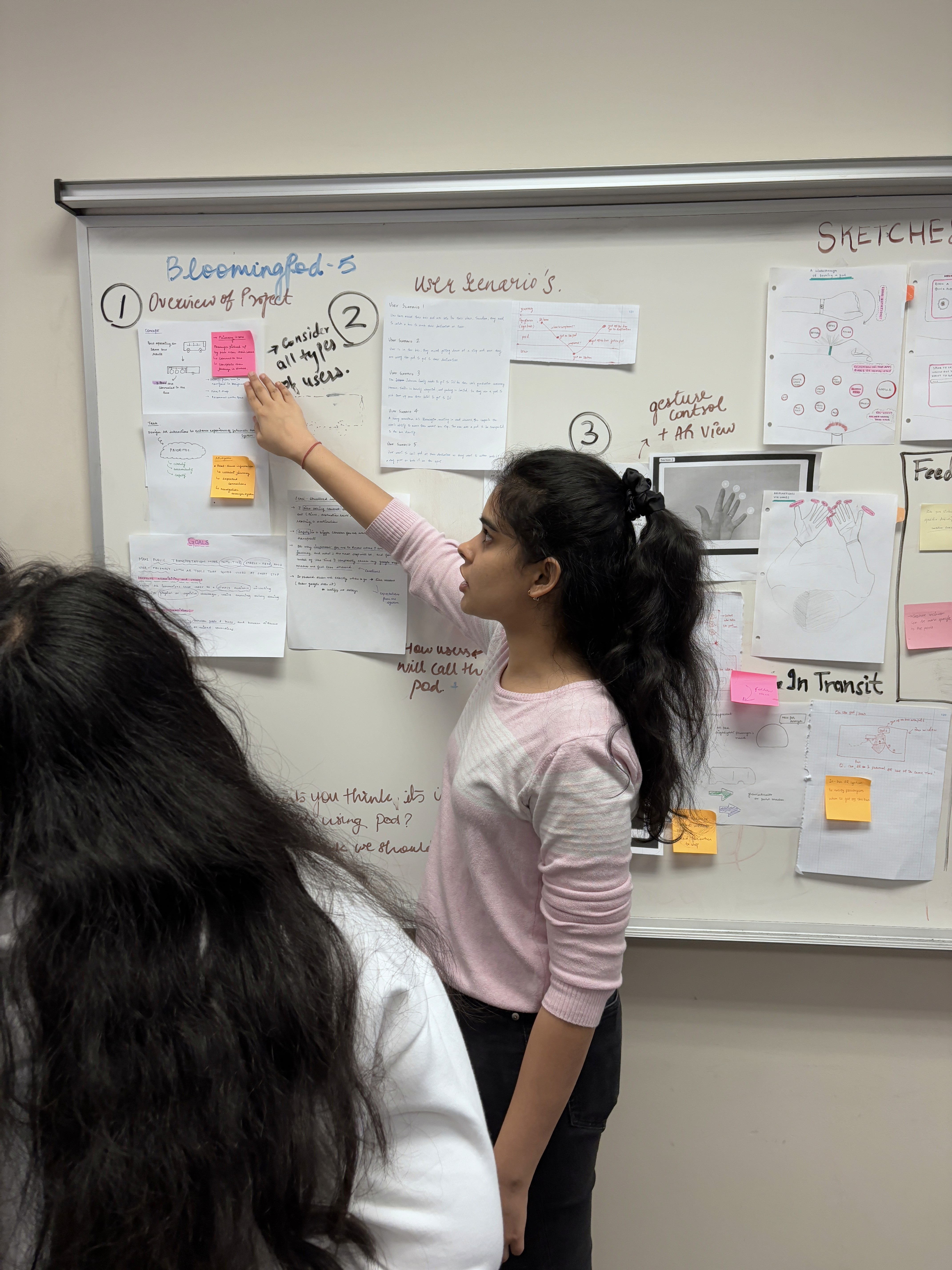
I translated raw research notes and interview transcripts into clear themes and opportunity areas, then narrowed a broad problem space into focused, testable design directions.
Rsearch synthesis
I ran and participated in interviews and usability tests, led affinity-mapping sessions, and clustered insights that revealed trust, clarity, and actionability as the project’s central problems.
Interaction & flow redesign
I redesigned key flows like homepage, My Performance, My Team, and the Coaching flow focusing on clarity, progressive disclosure, and low-friction actions that match engineers’ mental models.
Research driven decision
I consistently connected user research to product decisions, ensuring every design choice addressed validated pain points and respected technical constraints.
Problem Background
When Aude.ai launched its AI-powered performance evaluation platform, the expectation was clear that by aggregating data from tools like Slack, GitHub, Jira, and Confluence, the product would give engineers and managers a clear, unbiased, and continuous view of performance.
In practical level engineers want to understand why they are being evaluated in a certain way, not just what the system reports. Managers, on the other hand, need insights they can confidently use to support growth and guide conversations not dashboards that feel opaque or overly analytical.
We figured on broader level
This was a human-centered problem. Solving this wasn’t just about improving a dashboard it was about restoring trust, clarity in a system that directly impacts people’s work lives and evaluations.
Why This Problem Matters ?
Performance evaluation directly affects: Promotions, Compensation, Career growth and Trust between engineers & managers. If users don’t trust the system generating insights about them, they won’t engage with it no matter how advanced the AI is.
For Aude.ai specifically:
Low adoption meant the core value of the product wasn’t being realised
Managers lacked confidence using insights in real conversations
AI risked being seen as surveillance instead of support
How might we design AI systems that evaluate people without making them feel judged, confused, or reduced to numbers?
Key Realization that shaped the projects direction
While analyzing the insights from interviews and usability testings, we realised the biggest gap wasn’t missing insights it was the lack of a bridge from insight → understanding → action. Aude.ai was good at telling users what was happening but it struggled to help users understand.
Why it was happening
What they should do next
Who should be involved in acting on it
This insight reframed our approach from thinking “How do we improve the dashboard ?” we focused on “How do we help engineers and managers move from awareness to meaningful growth?”
This realisation is what pushed AI coaching as a secondary feature into a core design pillar, and it influenced every major design decision.
How I Came to Understand the Constraints
Through sponsor conversations, technical understanding, and research, we identified several non-negotiables, these constraints were treated as design parameters. Having these constraints early in the process helped us avoid over-designing and instead we focused on clarity, information discovery , explainability, and human involvement.
The AI models and data sources already existed
We couldn’t redesign how data was collected, only how it was surfaced
Users were skeptical of about AI insights, therefore having fully automated coaching feature would not be trusted.
The platform had to support both engineers and managers, without introducing bias
Coaching had to fit into existing workflows, not feel like extra work.
What We Designed : Solution Space
Based on research and discovery, the project resulted in following design spaces. Each opportunity space addresses a specific breakdown in trust, clarity, or actionability that we observed during discovery.
Based on research and discovery, the project resulted in following design spaces. Each opportunity space addresses a specific breakdown in trust, clarity, or actionability that we observed during discovery.
Discovery & research
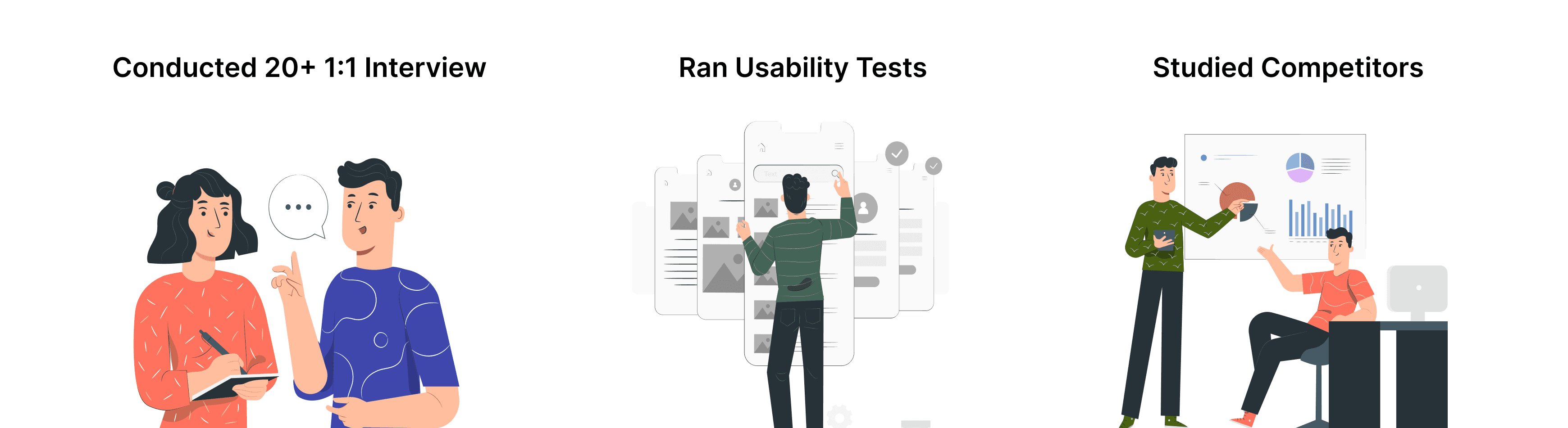
We concentrated on how people feel and behave when they go through performance reviews not just which buttons they click.
We conducted 1:1s interviews, ran platform audit of the existing platform and studied competitors and to make sense of what we learned, we then grouped observations into themes/ categories through affinity mapping and found patterns that revealed users didn’t get stuck at a single broken screen. Instead, frustration built up over time across the entire platform.
Research Insights
Trust breaks when AI decisions aren’t explained
Engineers were uncomfortable being evaluated by a system they couldn’t understand.
“I’m okay with feedback, but I need to know why I’m seeing it. Otherwise it just feels like a black box judging me.”
Engineers skim long content and miss important insights
Many engineers didn’t fully read the insights because the interface felt dense and overwhelming.
“There’s so much text here. I don’t know what’s important, so I just skim and move on.”
These insights shape the direction of solution ideation. The real issue was that users needed help making sense of insights and turning them into actionable progress. This information guided every major design decision:
Clear content explanations
Scannable information
Human-centered coaching
Actionable next steps info
Design Exploration & Decision-Making
Based on our research insights and the problem areas identified, we established four key goals that would guide the foundation of our design process:
Develop better coaching infrastructure
Design a product that doesn’t just evaluate but helps achieve impact through good collaboration
Develop a more holistic evaluation approach for engineers & managers
Make the platform more intuitive, transparent & trustworthy.
According to our goals and problem areas identified, We started by fixing the foundation helping users trust and understand what the system was telling them.
My Performance Page for Managers and Engineers
My performance page as the name suggested was a section dedicated to evaluation, it was supposed to deliver a clear, easy evaluation overview without diving into detail for each and have action items and agenda clear to start taking action on it.
The performance overview section in this page was supposed to deliver a clear, easy evaluation overview without diving into detail for each. The visualizations were vague and did not provide immediate feedback and insights to engineers and managers.
However, the page had multiple problems including text heavy interface, vague suggestions, vague visualizations, and inactionable insights.
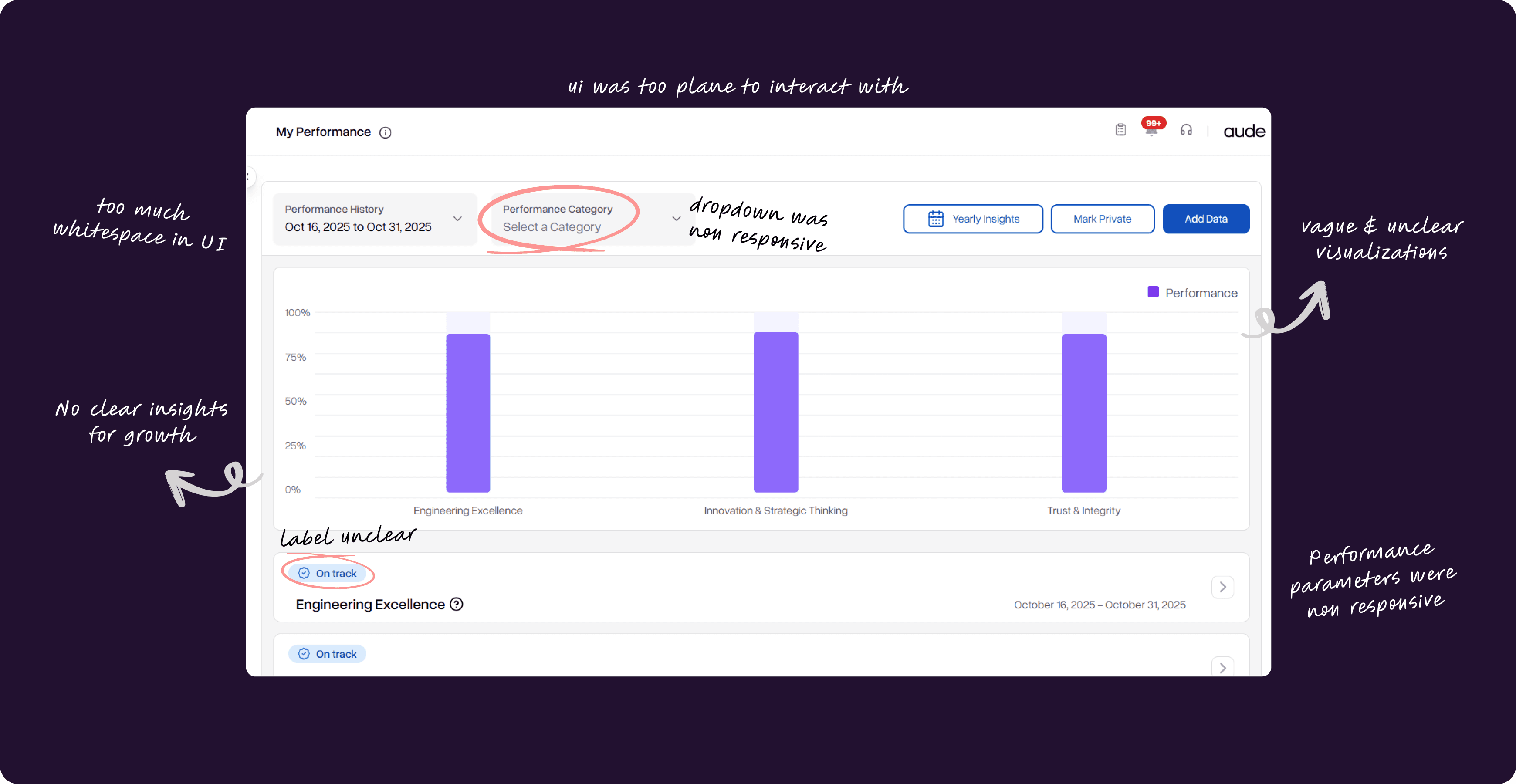
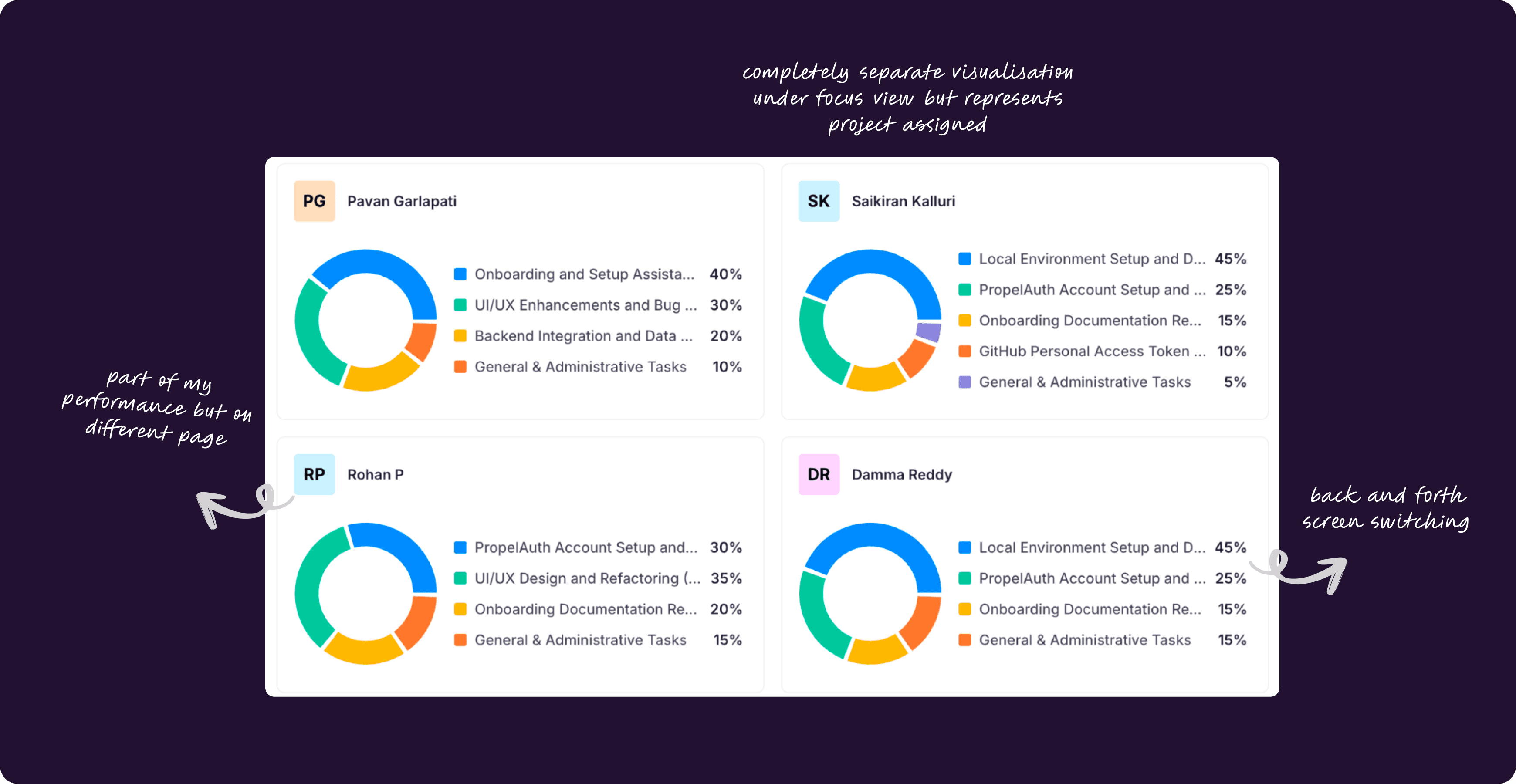
Our goal was to address the issues and create an informative sections without causing information overload. Specifically, we wanted to make the visualizations intuitive and clear, reduce text and overwhelming content, provide actionable task and action suggestions, and make the dashboard transparent by showing why those suggestions are given and where they are coming from.
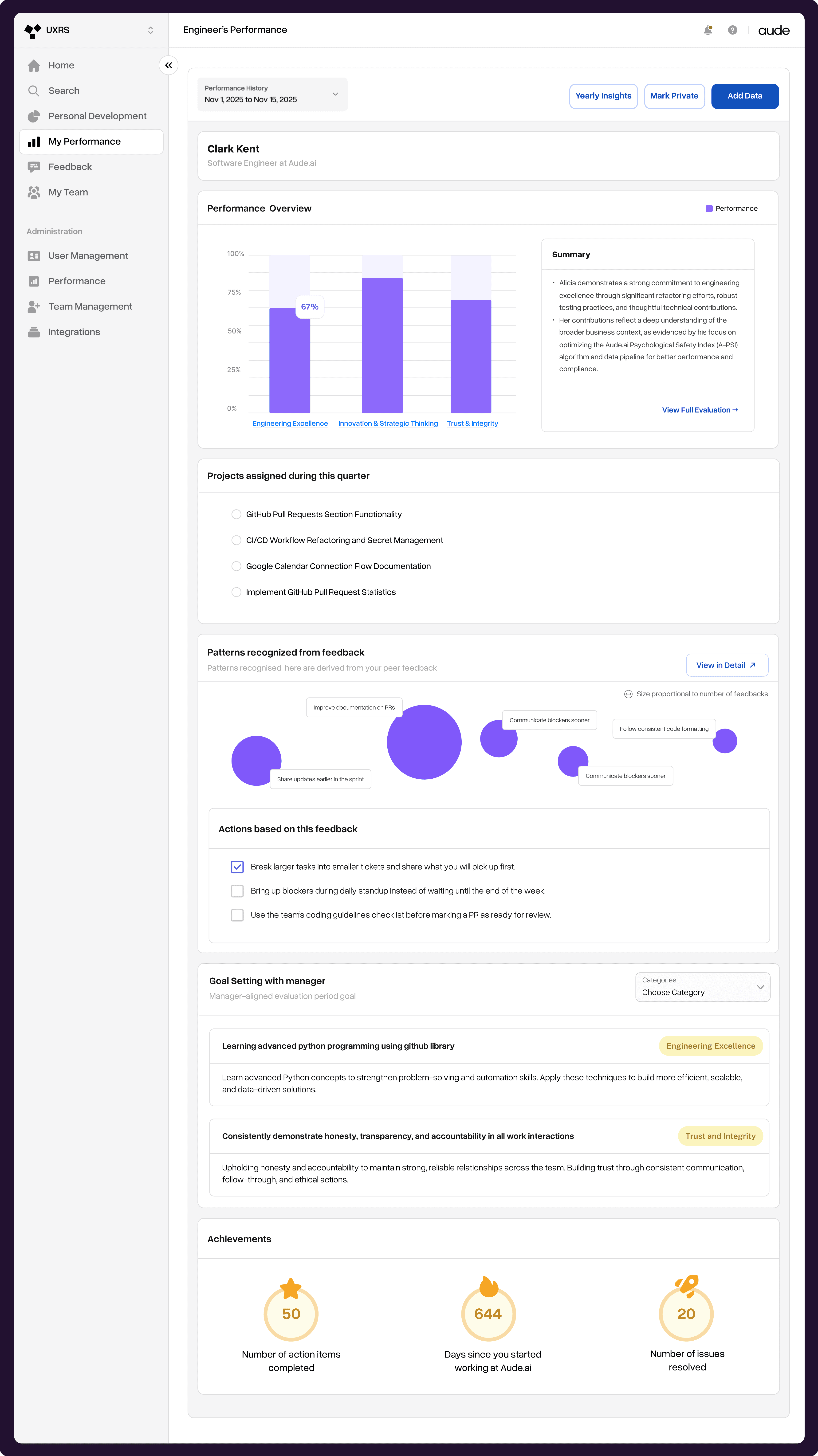
Section 1: Performance Overview
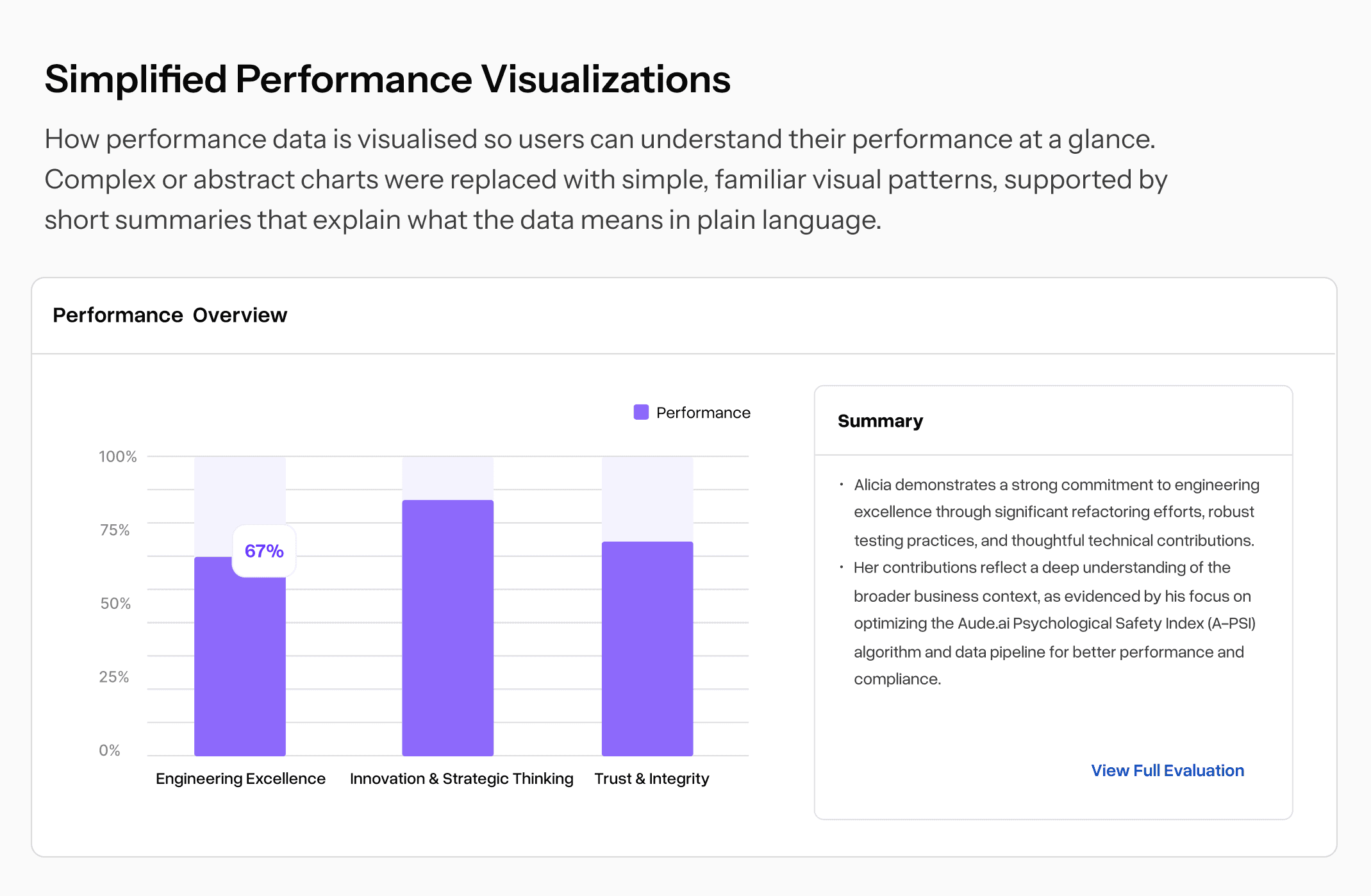
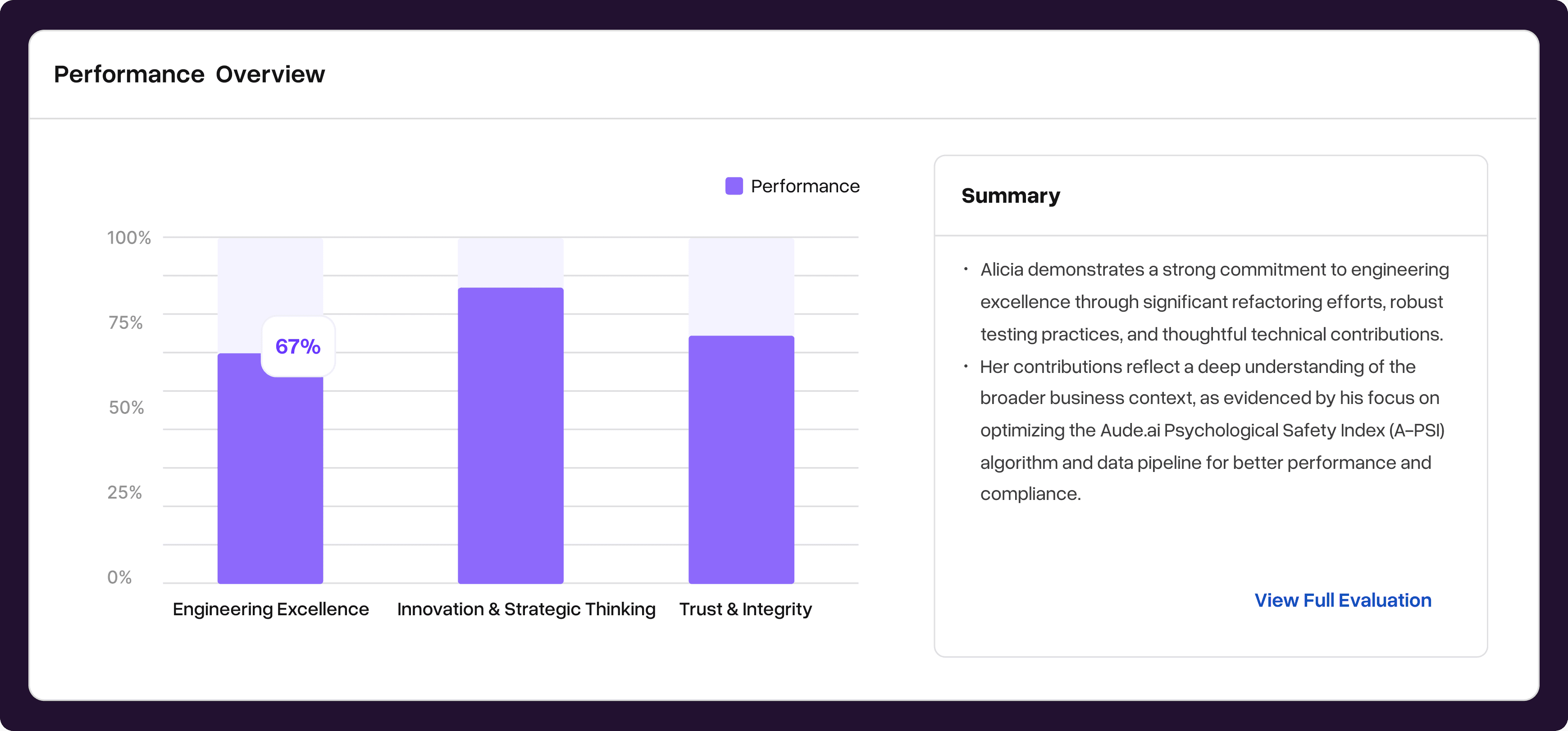
The goal of redesigning the performance overview card was to provide necessary context to engineers at the first glance, providing quick access to information and making visualizations clearer and easy to understand. What we discovered was the descriptions of the performance were broken down by each criteria but the descriptions were long and text heavy. Overall, we saw an opportunity to create a more holistic performance evaluation for engineers and managers.
In our redesign, we addressed the visualization by making them clearer and easier to understand. We also introduced a summary beside the visualization to provide meaningful and immediate context to engineers and managers on how they are performing.
This way, they would get an idea what they are looking at and have an option to read the full evaluation if they want.
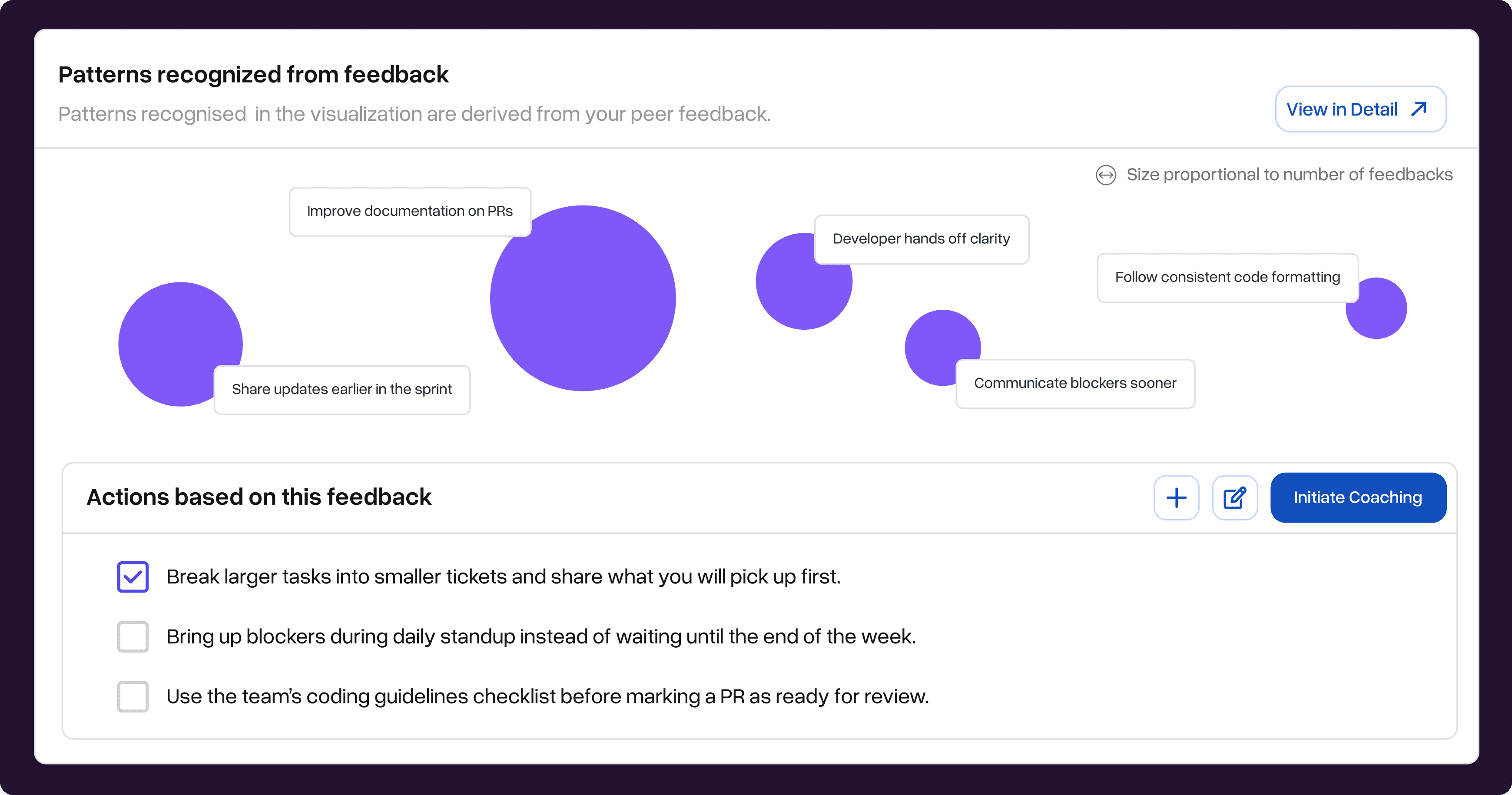
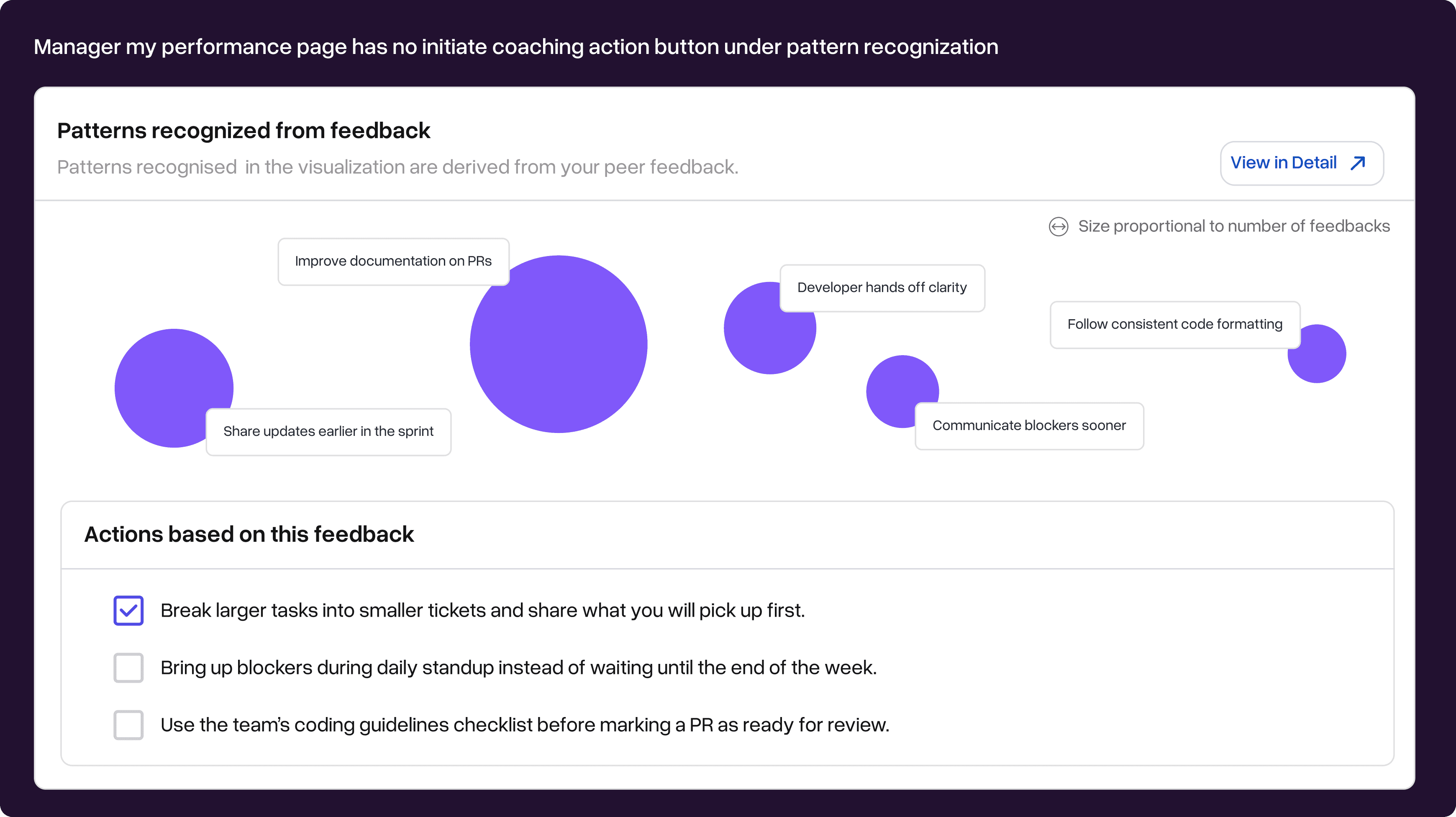
Pattern recognition
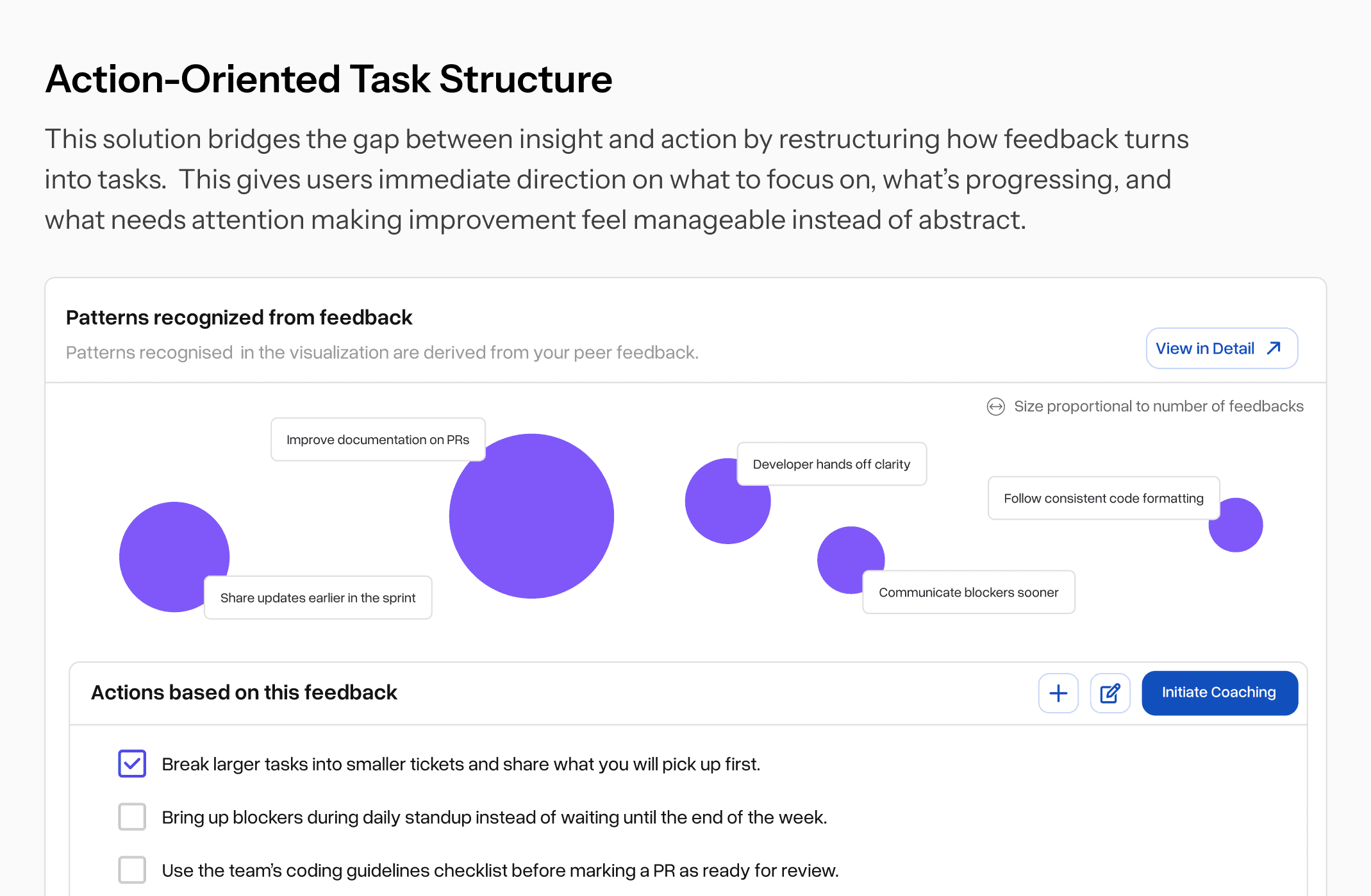
The goal of introducing pattern recognition was to use the LLM model’s strengths to surface feedback in consistent, actionable, noticeable ways and improve cross-functional collaboration.
It is meant to provide peer/ employee feedback to individual contributors in a non-confrontational way, creating a two way street for collaboration between engineers and managers.
The goal was also to provide a safe and secure channel to give frank and genuine feedback, especially considering employee to manager feedback is often not delivered because of the fear of awkward conversations.
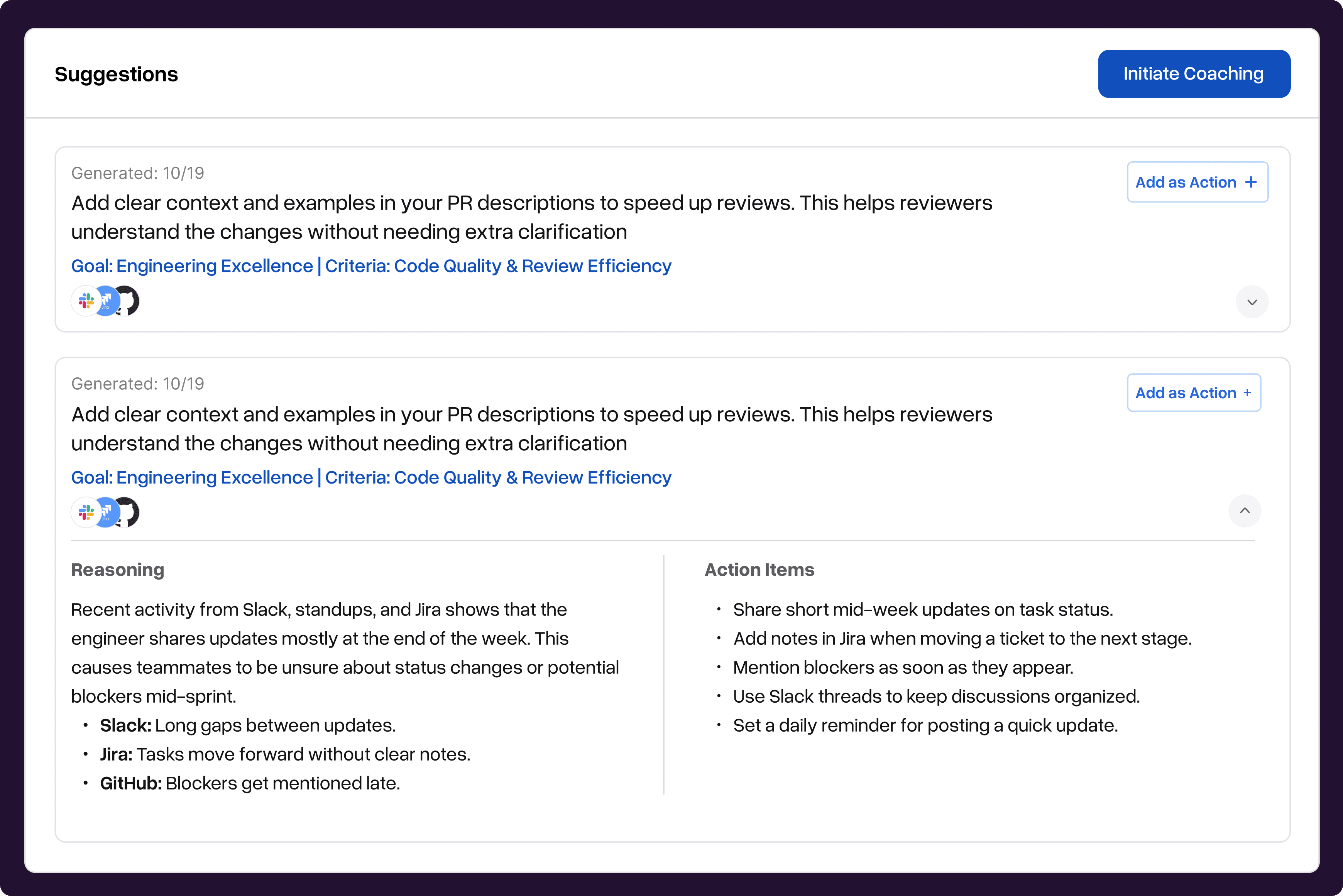
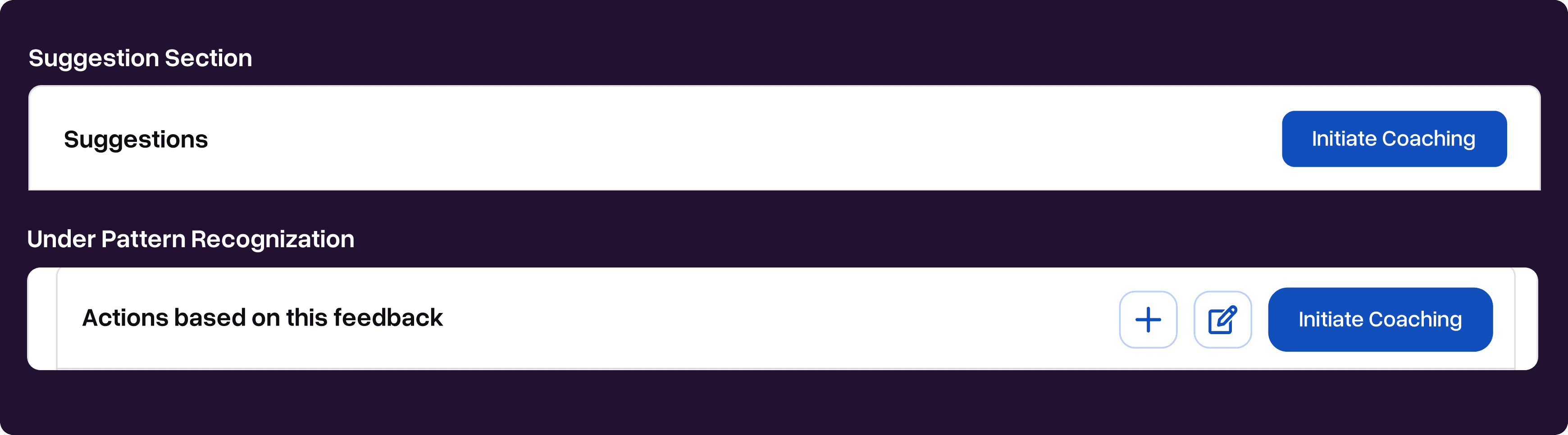
Suggestion section
We conducted user interviews through which some of the engineers mentioned that they did not think that they were specific enough. Following is the quote: “They’re helpful, but they seem more general… not as specific.”
The engineers also mentioned that: “The suggestions feel vague. I can’t tell where they’re coming from.”.
An engineer also mentioned that: “I personally would love some insights, but I need to figure out what I’m supposed to do with them.”
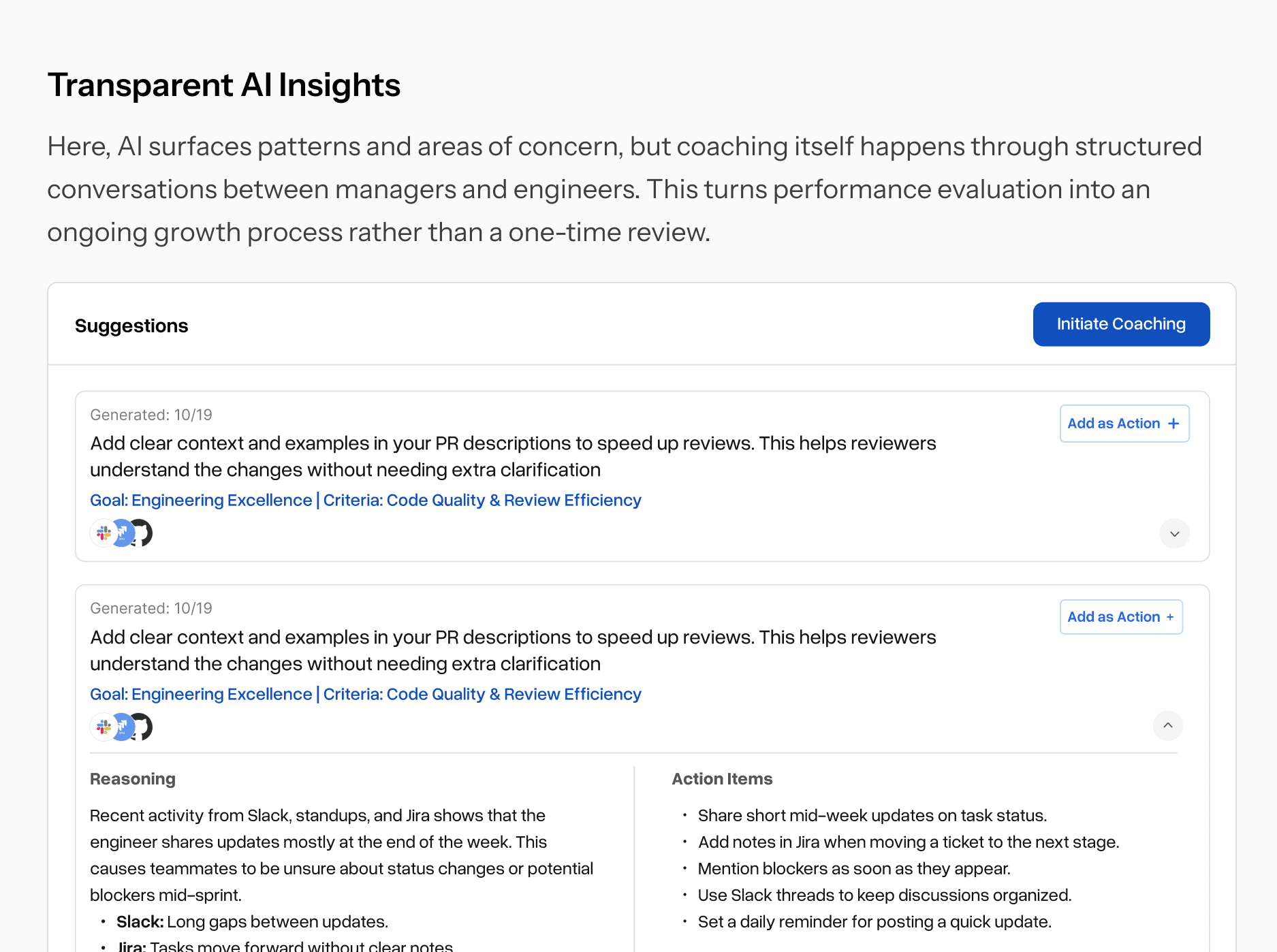
The goal was to make suggestions appear less vague, more insightful and something that engineers could translate directly into action items while also mentioning which sources have the suggestions coming from.
After the redesigning
Suggestion cards now include: Suggestion → Sources → Reasoning → Action items.
Engineers can convert suggestions directly into tasks.
Usability tests: participants appreciated the reasoning for each suggestion and used the bottom filter to quickly surface relevant items.
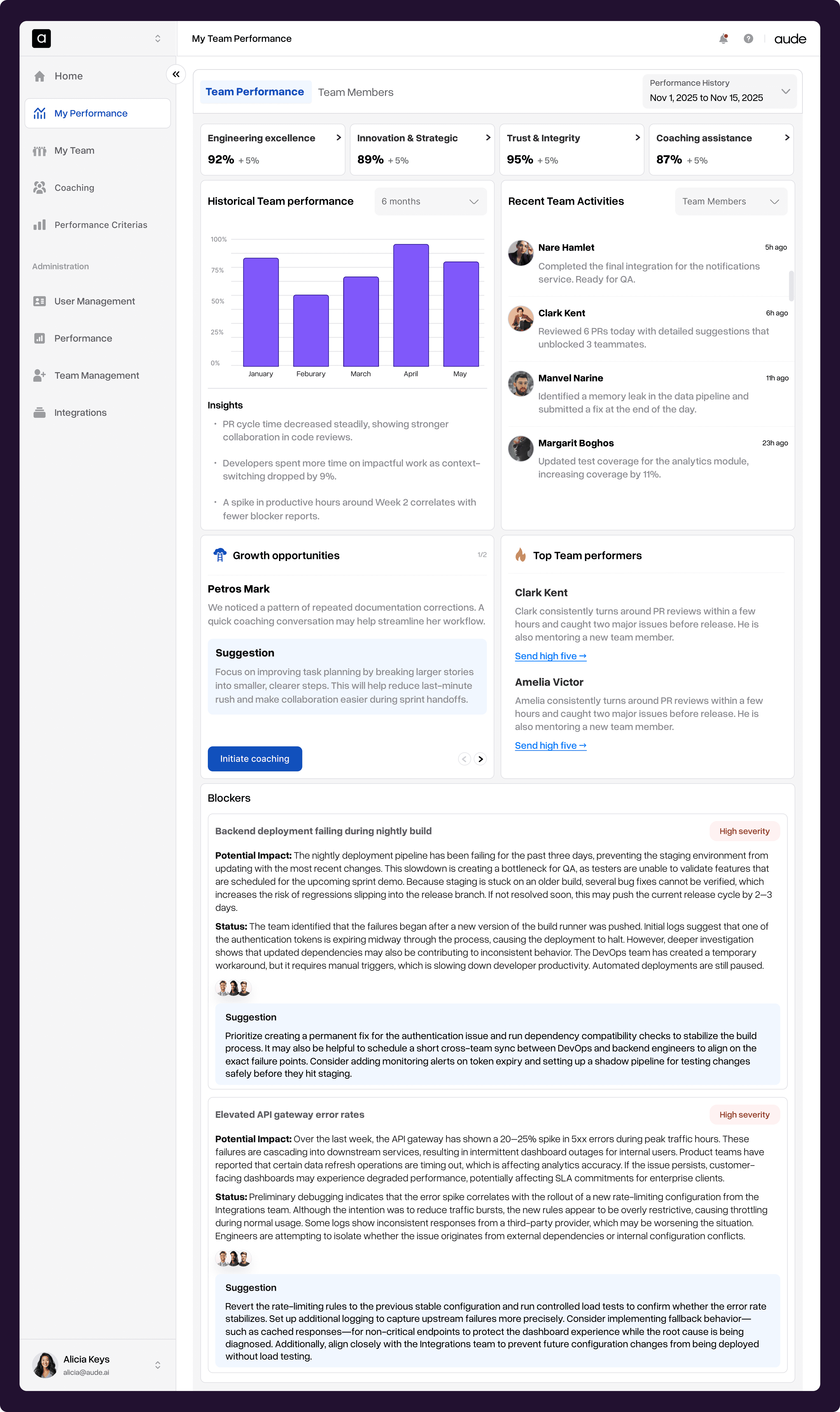
My team performance
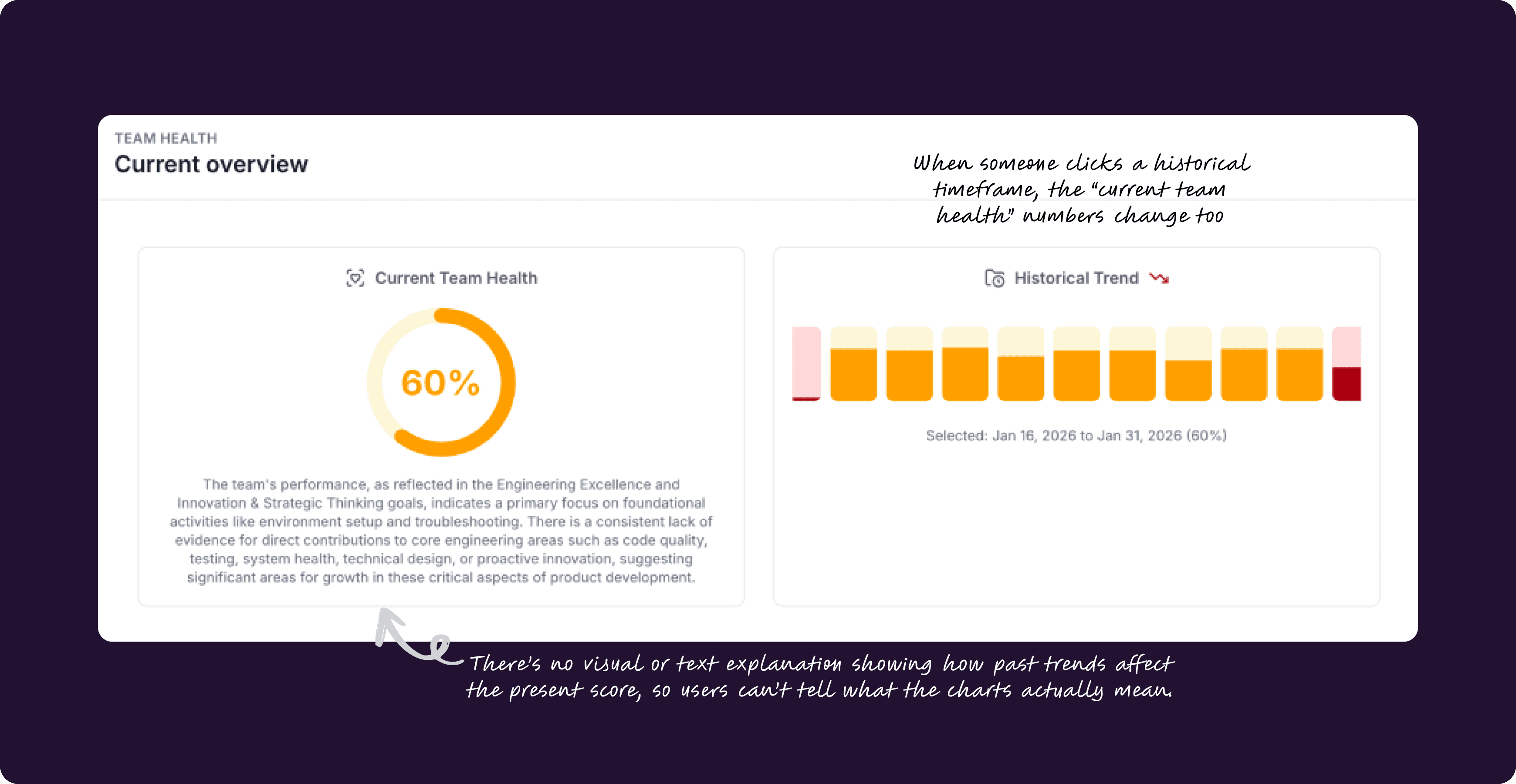
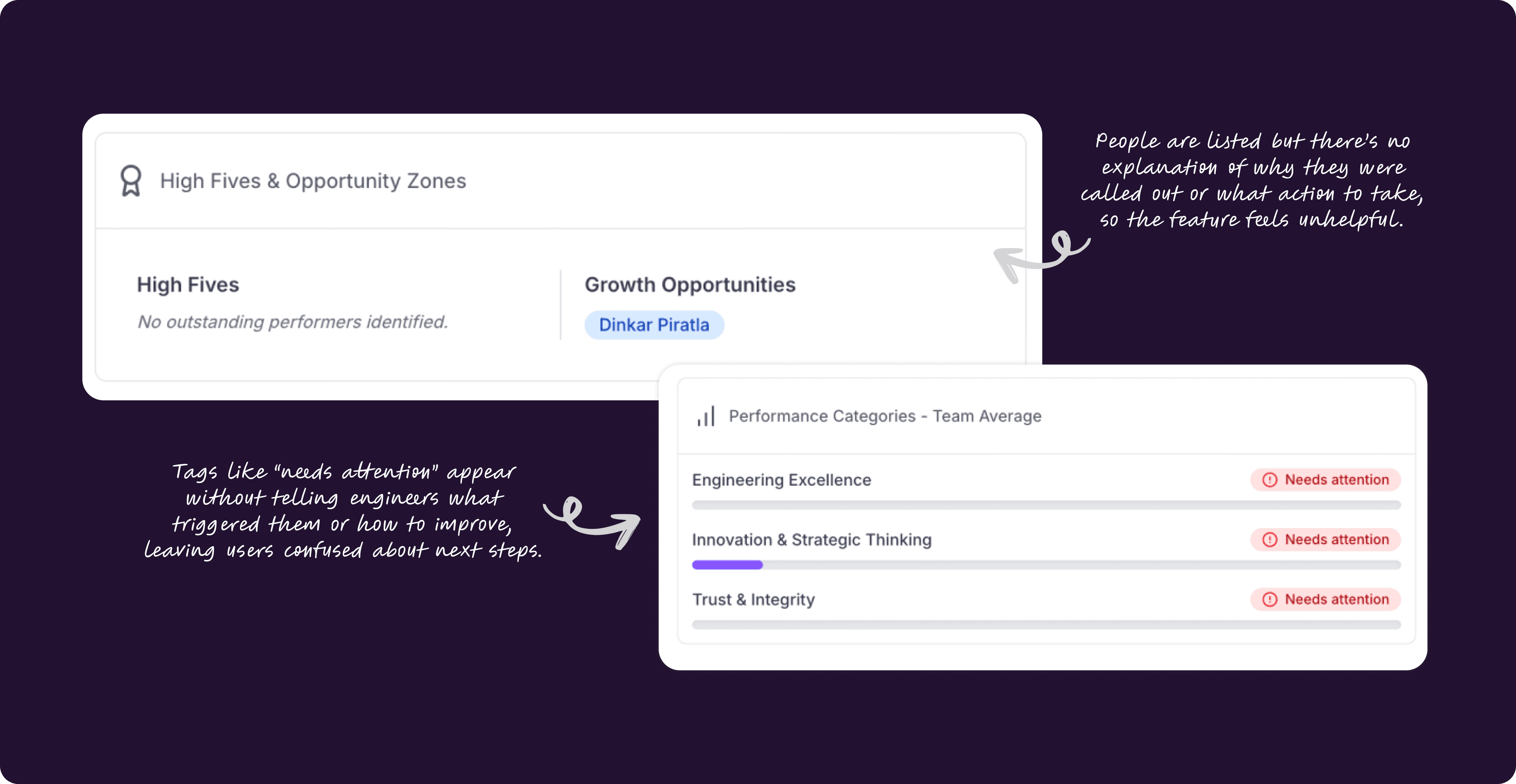
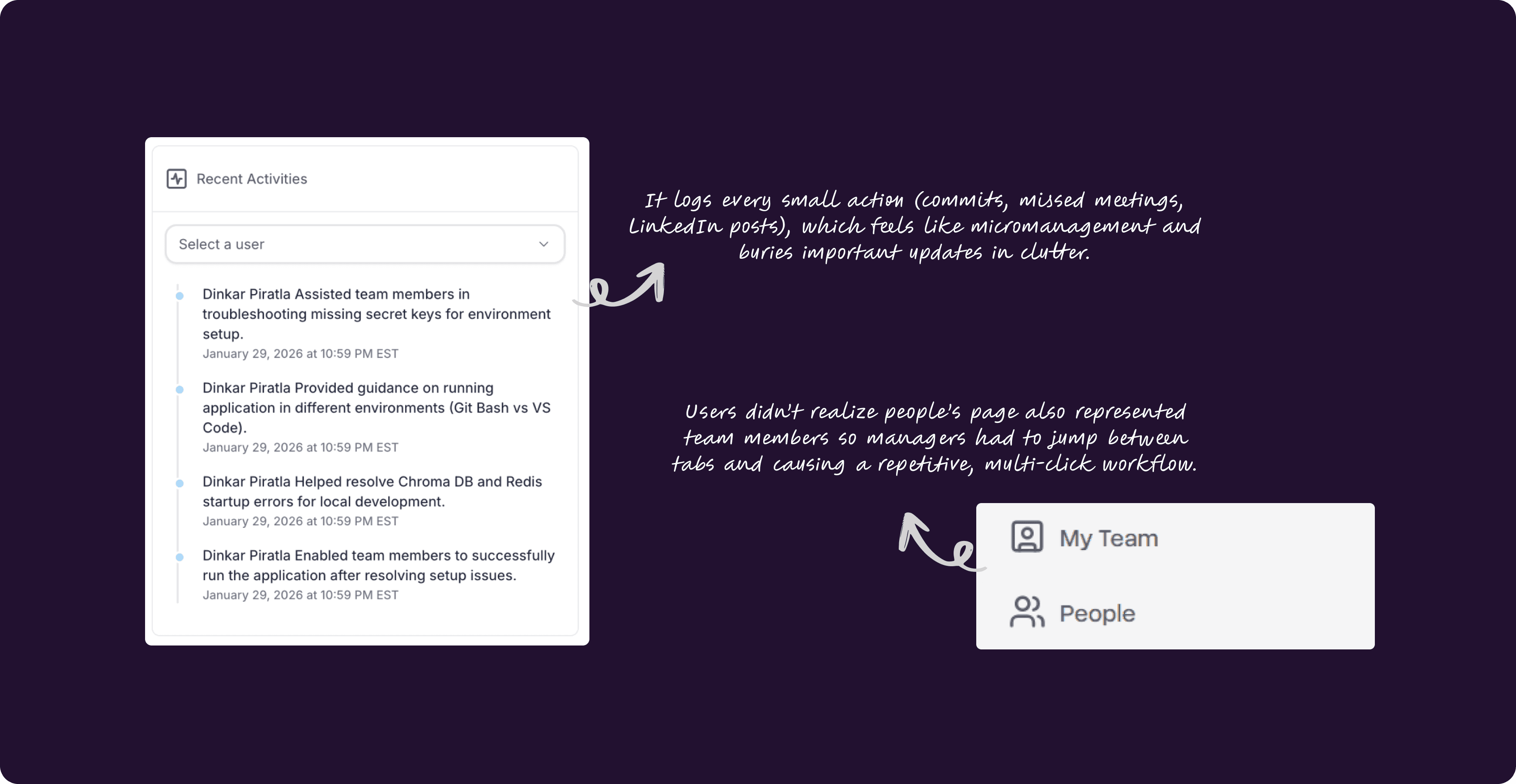
My team performance page initially showed the team health, historical trend, challenges and recent activities by team members. From our user research, we received feedback regarding how some of the sections required more information and insights and also how the platforms can increase collaboration which is also one of the goals for designing.
To tackle this, we began with a structured approach. After multiple iterations the proposed design featured were:
The page is divided into two tabs - team performance and team member so that it is easier to switch and find relevant information quickly. Managers can access both Team Performance and People tabs to review historical team metrics and identify employee growth opportunities. Engineers will only have access to the People tab.
Team performance based on company criterias is visualized at the top so managers get an immediate, at-a-glance view of team health, utilization, and priority areas that need attention.
Historical performance is clearly tied to selected timeframes and surfaces insights from that period; recent activities are curated and filterable by user or team (not by project) to reduce noise and surface what matters.
Recent activities were streamlined to show only the most important information that can be filtered by users and projects.
The Top Performers list shows why each person was highlighted (reasoning), plus a “high-five” button for quick recognition; Growth Opportunities explain why someone appears there and include Aude.ai coaching suggestions so managers can start a coaching session with one click.
Coaching feature
Coaching was something our sponsors were eager to add and it quickly became obvious it was missing. During interviews, both engineers and managers said Aude’s suggestions could be helpful, but they didn’t always know what to do with them. As one engineer put it:
“If these suggestions don’t turn into concrete tasks, then what’s the point?”
Comments like this made the gap obvious:
Users wanted clear next steps, not just observations. They expected the platform to guide them on how to act on AI suggestions instead of leaving them guessing, and they wanted coaching that felt supportive and integrated into the product experience.
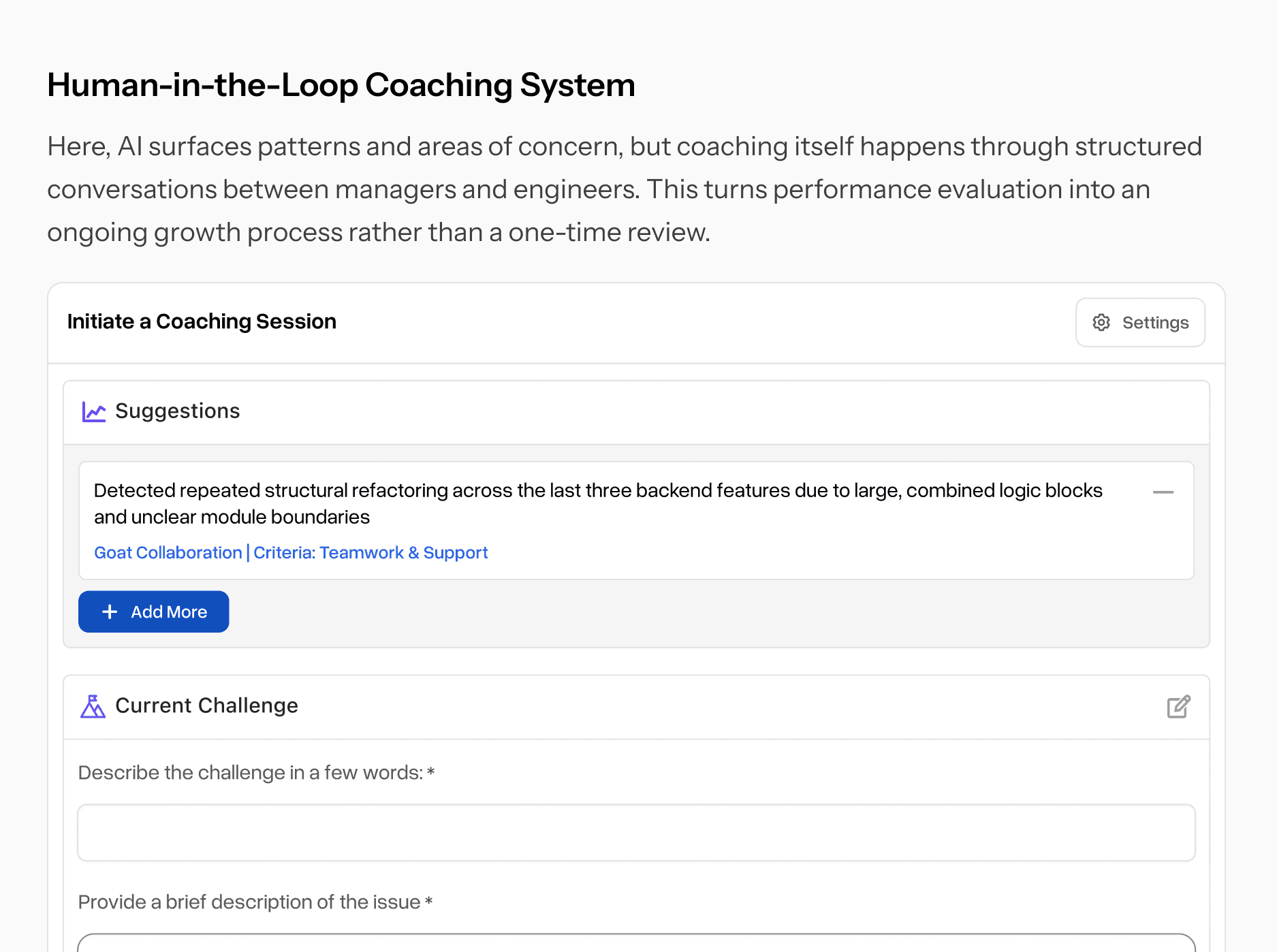
Our goal is to make coaching feel natural and effortless: AI should surface issues early and support engineers and managers in taking action through facilitated conversations that provide clarity and guidance.
For Engineers : Initating coaching
If an engineer notices a recurring pattern on their My Performance page and wants guidance, they can kick off a coaching request straight from that pattern. Likewise, every suggestion on the homepage has an “Initiate Coaching” button so when someone sees a recommendation and isn’t sure what to do, they can request coaching right then and there. This makes help feel timely and normal, not something you wait for until review season
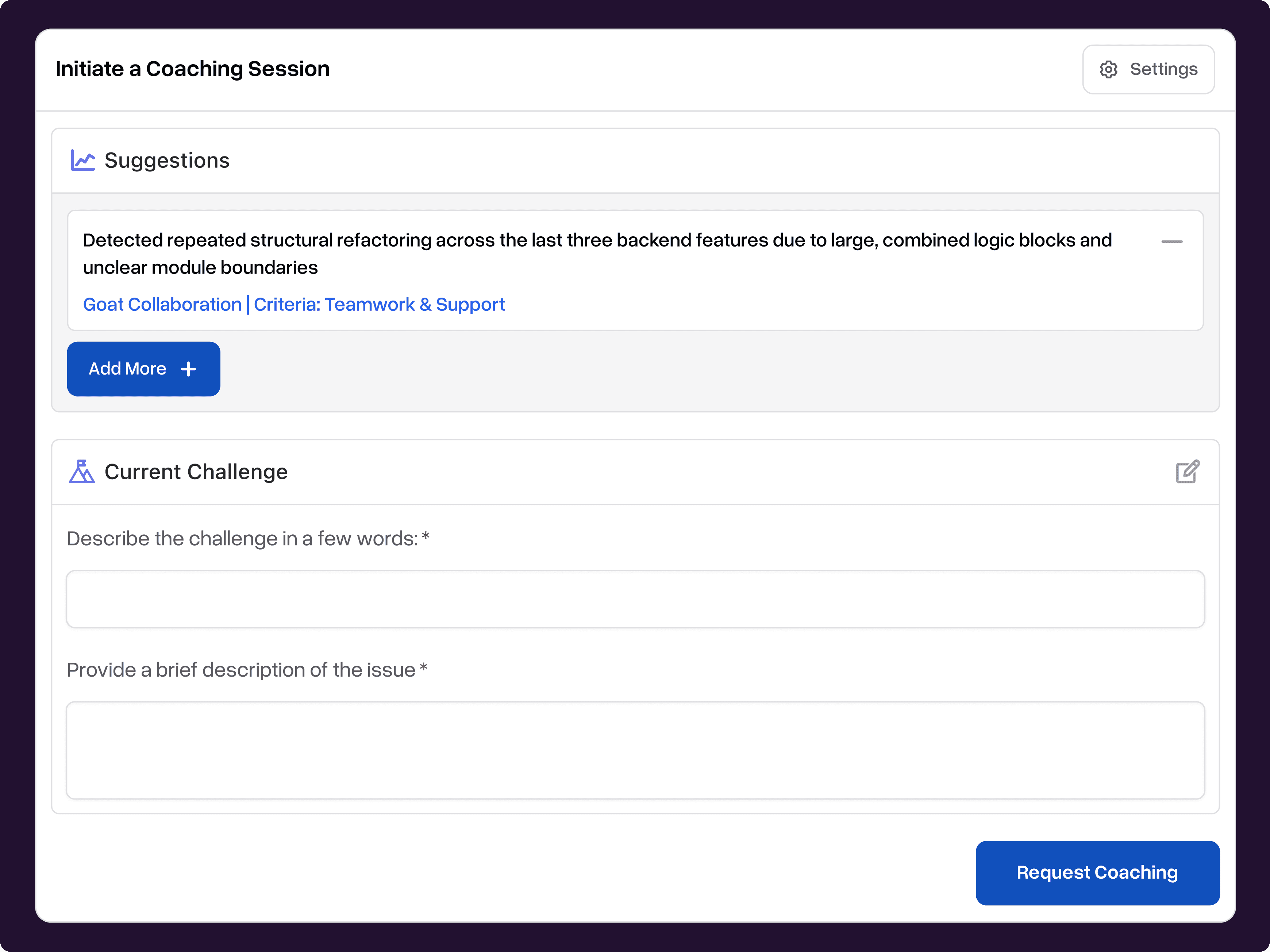
When an engineer clicks “Initiate Coaching”, a focused overlay opens . They can attach the exact suggestion or pattern they want help with, add a short description of the challenge (confusion, blocker, or growth need), and submit the request. Submitting automatically triggers a structured coaching series with their manager.
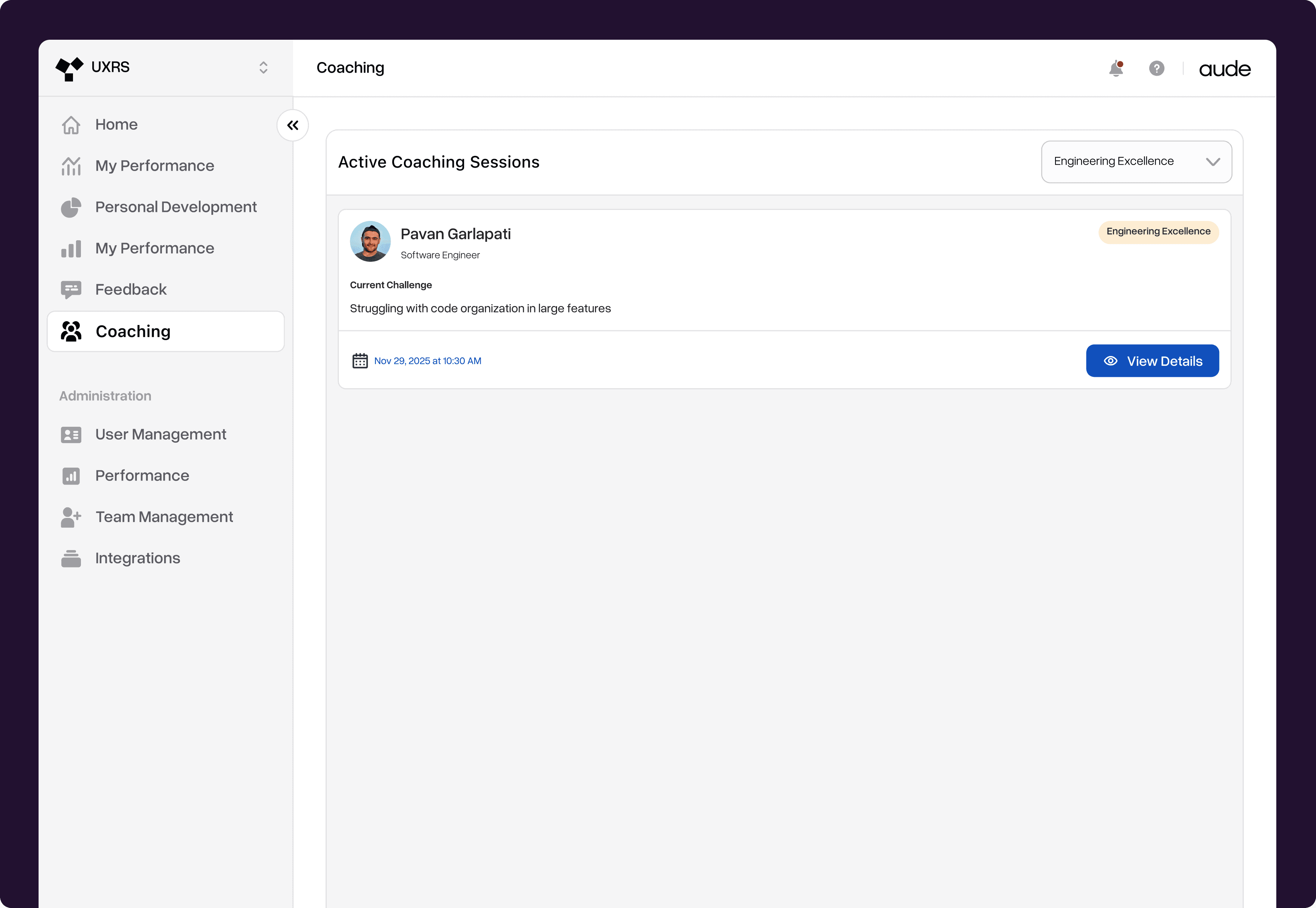
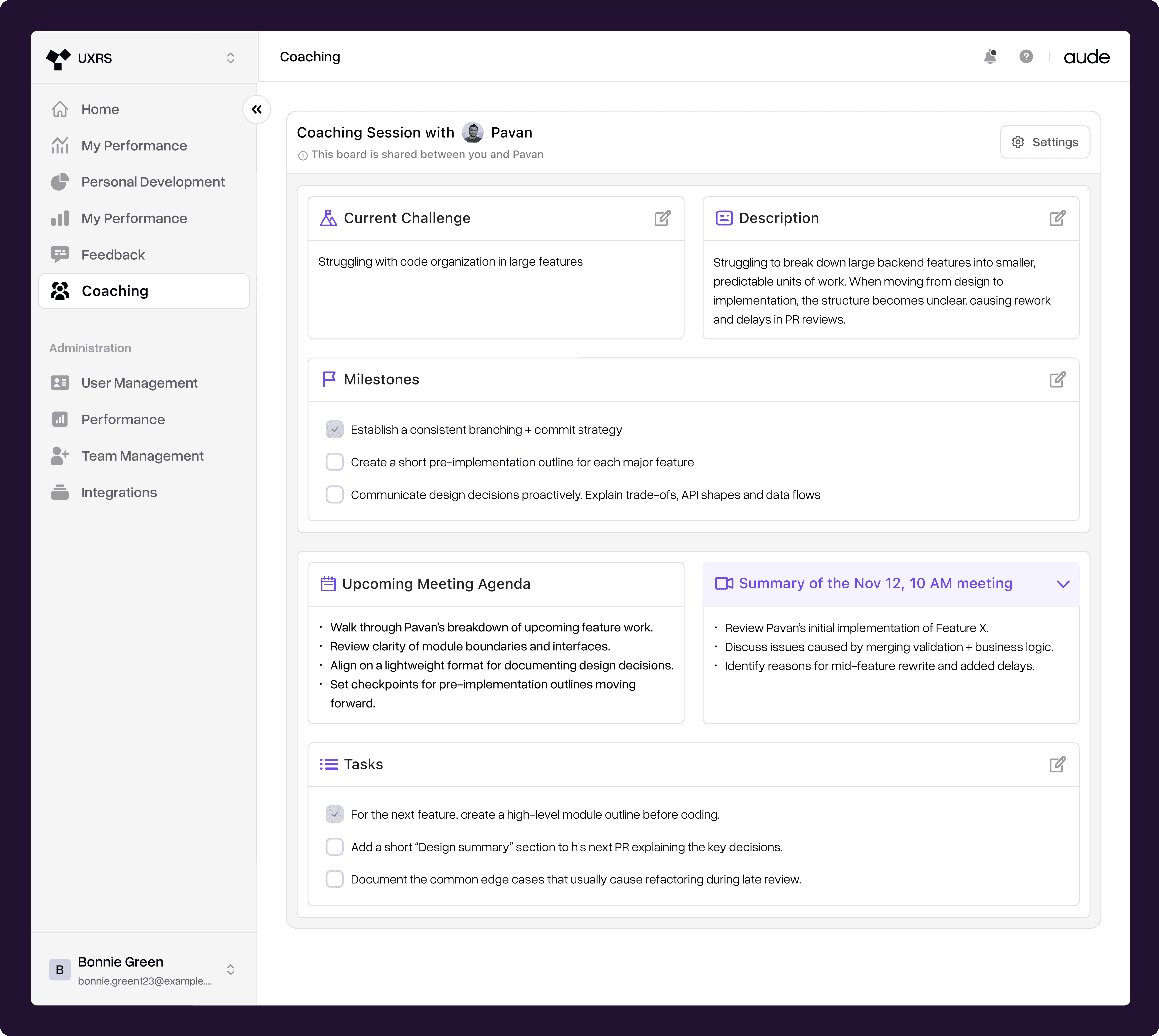
Once a request is submitted, it lands in the Coaching tab. The tab shows all active coaching sessions as cards with quick context (profile, category, schedule). Click View Details to open the shared coaching profile and see goals, notes, and milestones.
For Manager and Engineer - Shared Coaching Profile Page for Each Engineer
Once a coaching request is approved, the engineer and manager move into a shared coaching space dedicated to that specific challenge. Both parties can edit the page; the first 1:1 aligns on the problem, clarifies expectations, and co-creates an action plan the engineer feels confident about.
That plan becomes a set of milestones for long-term progress and short-term tasks for the next check-in everything (challenge, description, milestones, tasks) is captured in one place.
Aude’s AI supports the workflow by suggesting meeting agendas and surfacing relevant patterns from past data. Over time the page becomes a searchable log of conversations and updates, making coaching structured, trackable, and ongoing.
Project limitations
No control over aggregated data sources
The platform’s suggestions relied on data from Slack, Jira, and GitHub, and we couldn’t change how that data was captured which limited our ability to improve upstream data quality or fix source-side biases.
Data fidelity and context gaps
Because we couldn’t control or enrich the raw data, some suggestions lacked needed context, making explainability and precise action recommendations harder to achieve.
Human-in-the-loop requirement due to trust limits
Users didn’t fully trust AI-only coaching, so we couldn’t design a fully automated coaching workflow; the product needed to center managers as human facilitators.
Key Learnings and Takeaways
🧩
Trust matters more than intelligence
Even the smartest AI insights don’t help if people don’t understand or trust them. I learned that explaining why something appears and how to act on it is more important than adding more data or complexity.
🧩
Insights only matter when they lead to action
Showing feedback isn’t enough. People need clear next steps, structure, and sometimes human support to actually improve. Designing the bridge from insight → action → growth made the biggest impact in this project.
🧩
Good design works within constraints, not around them
I learned that constraints aren’t blockers they guide better decisions. Working within fixed data sources, AI skepticism, and real workflows helped me design solutions that were practical, trustworthy, and realistic to build.